

# How to use Claude safely in your business
Claude can help a small business draft emails, summarise documents, prepare meeting notes, compare ideas and turn rough information into a clearer first draft. The difficult part is not learning clever prompts. It is deciding which account staff should use and what information they are allowed to give it.
The short answer is: use Claude Team or Enterprise for business information, not a collection of personal Free, Pro or Max accounts. Anthropic treats Team, Enterprise and its API as commercial products and says it does not use customer chats or coding sessions from those products to train its generative models by default. Consumer accounts have different terms and individual privacy choices.
That does not mean every business document is automatically safe to upload. A suitable plan is one layer. Your business still needs rules for access, confidential information, connected apps, retention and human review.
Does Anthropic train Claude on business data?
For Anthropic’s commercial offerings—including Claude Team, Enterprise and the Anthropic API—the company says it will not use chats or coding sessions to train its models unless the customer opts into a programme or deliberately supplies feedback for that purpose. Anthropic also describes itself as the data processor for Claude for Work, while the customer organisation controls its users and submitted data.
You can read Anthropic’s explanations in its commercial model-training guidance, data-controller and processor guidance, and Trust Centre.
Free, Pro and Max are consumer plans. Anthropic provides a privacy setting that lets individual consumer users choose whether new or resumed chats may be used for model improvement. That is useful for an individual, but it is not the same as an organisation-wide commercial agreement and centrally managed workspace. Anthropic’s consumer-terms announcement explains the distinction.
This is why a business should not rely on telling every employee to create a personal account and find the right privacy switch. People leave, settings change and the business has little central visibility.
Which Claude plan should a business choose?
Claude Team: the practical starting point for many small businesses
Team is designed for organisations that need a shared workspace, central billing and administration. Anthropic says model training is off by default for Team data. Team also provides business identity and access features such as single sign-on and just-in-time provisioning, although the exact features and seat options can change.
Team is generally the sensible starting point when:
- several staff will use Claude for normal office work;
- the business wants accounts owned and managed by the organisation;
- central billing and basic usage visibility are needed;
- staff need shared projects or approved workplace connections; and
- the business does not need advanced audit, retention or provisioning controls.
Anthropic’s current Claude plan comparison should be checked before buying because pricing, included usage and features change.
Claude Enterprise: for stronger control and compliance needs
Enterprise includes the commercial no-training-by-default position and adds controls intended for larger or more regulated environments. Anthropic currently lists features such as SCIM user provisioning, audit logs, a Compliance API, custom data-retention controls and role-based administration.
Enterprise may be appropriate when:
- staff accounts must be created and removed automatically from your identity system;
- the business needs audit records or security monitoring integration;
- different teams require different permissions;
- retention periods must be set centrally;
- an industry or customer contract requires stronger evidence of control; or
- the organisation needs a HIPAA-ready configuration and has confirmed the applicable scope.
The Enterprise plan overview explains the current controls and purchasing model. Do not assume that buying Enterprise alone meets a legal or industry obligation: special configurations, agreements and feature limitations can apply.
Anthropic API: for software and automated workflows
The API is for putting Claude inside a business process or application rather than giving staff a normal chat workspace. For example, a developer might use it to classify support requests, draft internal summaries or extract information from an approved document flow.
Anthropic says normal API inputs and outputs are automatically deleted from its backend within 30 days, subject to exceptions such as longer-lived features, safety enforcement, legal requirements or a different agreement. Some approved enterprise API customers can obtain zero-data-retention arrangements, but this is not the default and does not generally apply to normal Claude Team or Enterprise chat history.
Read Anthropic’s commercial data-retention guidance, zero-data-retention explanation, and Claude Platform documentation before designing an API workflow.
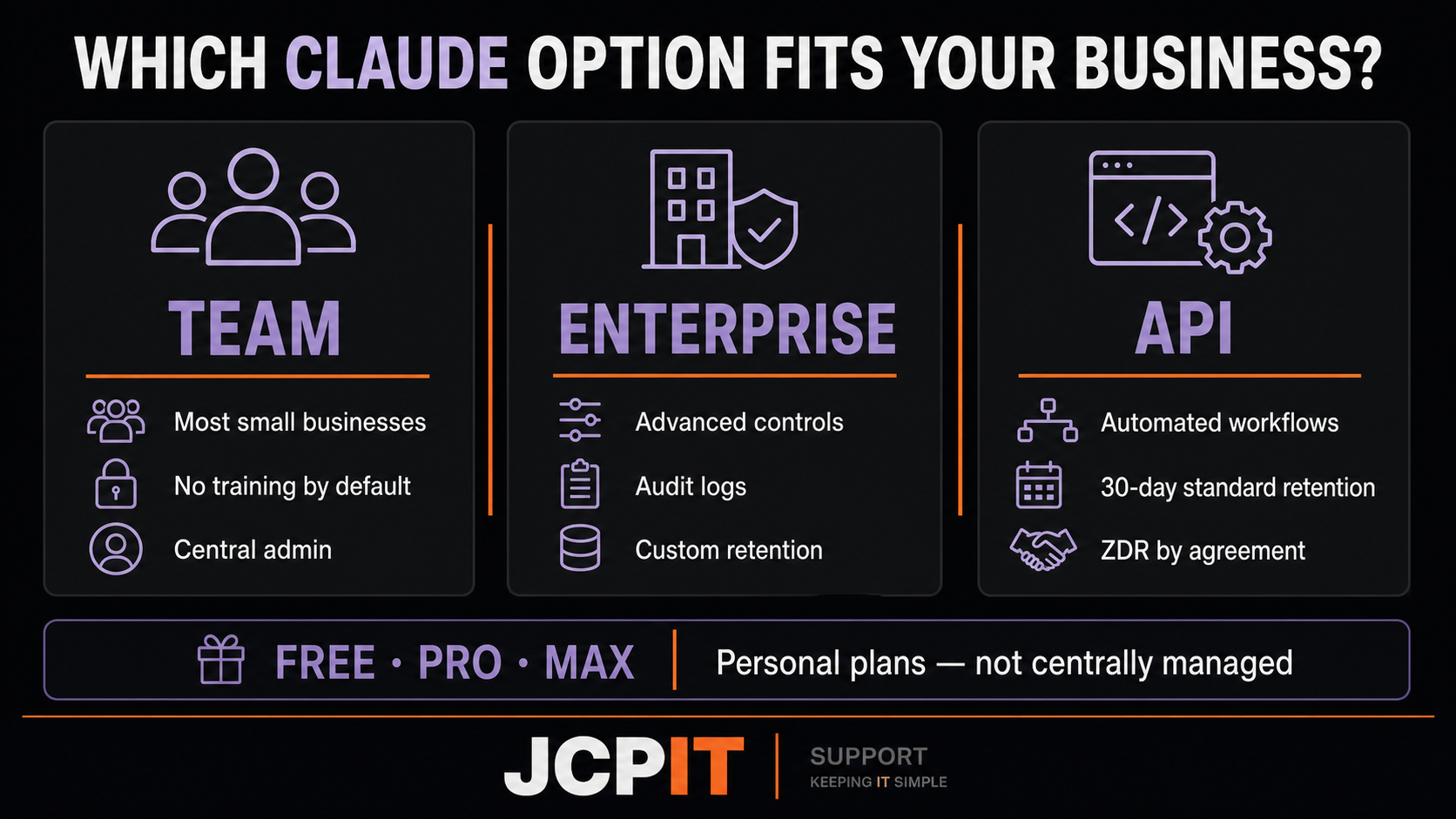
A quick guide only. Confirm current plan features and retention terms with Anthropic before purchasing or processing sensitive information.
“Not used for training” does not mean “not stored”
Training and retention are different questions.
Claude for Work keeps chats and coding sessions so users can return to their history. Users can delete chats, and Anthropic says deleted conversations are removed from visible history immediately and from backend systems within 30 days. Enterprise can provide additional retention controls.
That means a business still needs to decide:
- whether a document should be entered at all;
- how long conversations should remain available;
- who can see shared projects and connected data;
- what should be deleted when a task finishes; and
- whether a particular industry rule or customer agreement permits the use.
Also remember that connectors can send or retrieve information from other services. The privacy and security of the complete workflow may involve Microsoft, Google, Slack or another provider—not only Anthropic.
A safe way to introduce Claude at work
1. Start with a small list of approved tasks
Choose low-risk work where a person will check the result. Good starting examples include:
- rewriting an internal announcement in clearer language;
- producing a first draft of a meeting agenda;
- summarising a public report;
- turning non-confidential notes into an action list; and
- suggesting headings for a document that a staff member will finish.
Avoid beginning with customer records, health information, legal advice, employee decisions, passwords, bank details or confidential contracts.
2. Use business-owned accounts
Create the organisation workspace using company-controlled details. Add staff through the admin console and remove access promptly when someone leaves. If available for your plan, connect single sign-on so the same business identity controls used elsewhere also protect Claude.
Do not reimburse random personal subscriptions and call that a business rollout. That makes access, ownership and offboarding harder to manage.
3. Write a one-page AI rule
Staff should be able to answer four questions without reading a long policy:
- Which Claude workspace must I use?
- What information must I never enter?
- Who checks the result before it leaves the business?
- Who do I ask when I am unsure?
A useful default is: do not enter passwords, authentication codes, banking details, private customer records, health information, legal advice, confidential employee information or material covered by a client restriction unless the specific use has been reviewed and approved.
4. Review connectors before enabling them
A connector can make Claude far more useful because staff do not need to copy documents manually. It can also widen the information Claude can access.
Before connecting Microsoft 365, Google Drive, Slack or another service, check:
- which users can activate it;
- which files, mailboxes or channels it can reach;
- whether permissions follow the original system;
- what third parties receive data;
- how access is logged and removed; and
- whether the connection is actually needed for the approved task.
5. Keep a person responsible for every output
Claude can produce polished information that is incomplete, outdated or wrong. The person using it remains responsible for checking facts, calculations, names, dates and tone.
For higher-impact work, record who reviewed the output and which source documents were checked. Do not use Claude as the final decision-maker for hiring, discipline, legal advice, credit, health matters or other decisions that significantly affect a person.
A simple recommendation
For a typical small business with several users, start with Claude Team, company-owned accounts, a short acceptable-use rule and a small group of low-risk tasks. Choose Enterprise when the business genuinely needs automated provisioning, audit logs, custom retention, advanced role controls or compliance features. Use the API when Claude is being built into a controlled application or workflow.
Free, Pro and Max may be suitable for personal experimentation, but they should not become the unofficial home of customer files and business knowledge.
Plan features and privacy terms can change. This article was reviewed on 13 August 2026 using Anthropic’s current documentation and the supplied Claude security feature matrix. Confirm current details with Anthropic’s pricing page, Trust Centre and your legal or privacy adviser before processing regulated or highly sensitive information.
If you want help setting up business-owned accounts, access controls and a practical AI-use policy, talk to JCPIT. We can help with the technology and governance setup; legal and industry-specific advice should remain with the appropriate adviser.

